A B2B concept for accountants who check invoices and bank payments for several small firms. AI does the reading and the matching. A person approves every decision. In an estimate, one client’s month drops from about 48 minutes of checking to about 5. The percentages are estimates based on the steps in the flow.
less time per external invoice (4 min to 30 s)
less time per e-Factura check (45 s to 5 s)
less time per matched payment (25 s to 2 s)
a month per client instead of ≈48 (estimate)
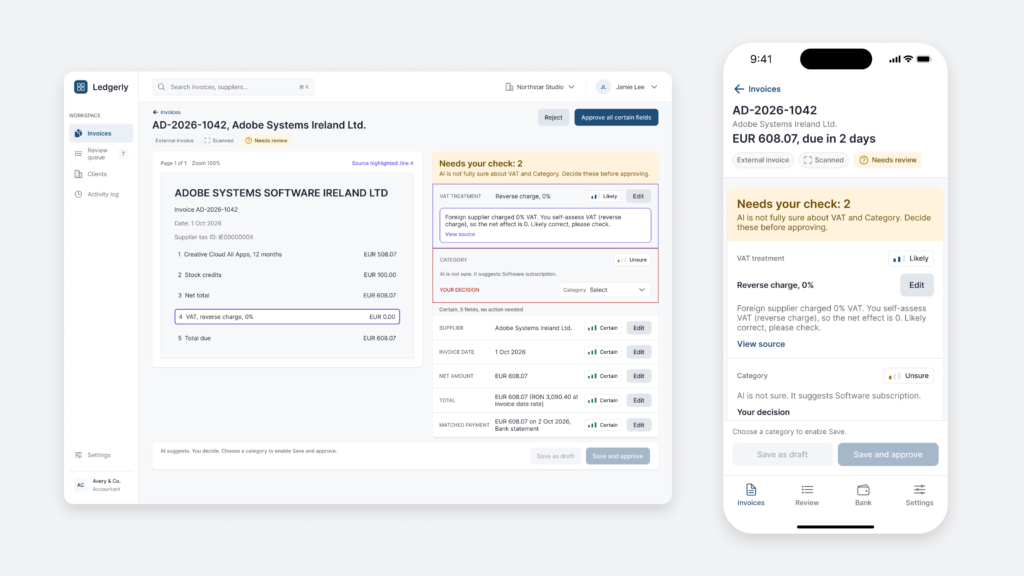
Ledgerly is a concept for a B2B product: an AI assistant that reads invoices and bank statements for accountants. The AI prepares the work and finds the hard cases, and the accountant makes every decision.
UI/UX Designer, end to end
Concept, B2B product
Desktop web app and mobile
Figma, interactive prototype
AI flows, trust, human decision
Accountants check the same invoices and bank lines every month, and the hard cases hide in the pile.
AI reads and matches the documents, flags the cases it is unsure about, and the accountant approves in a review queue.
An example month for one client drops from about 48 minutes of checking to about 5.
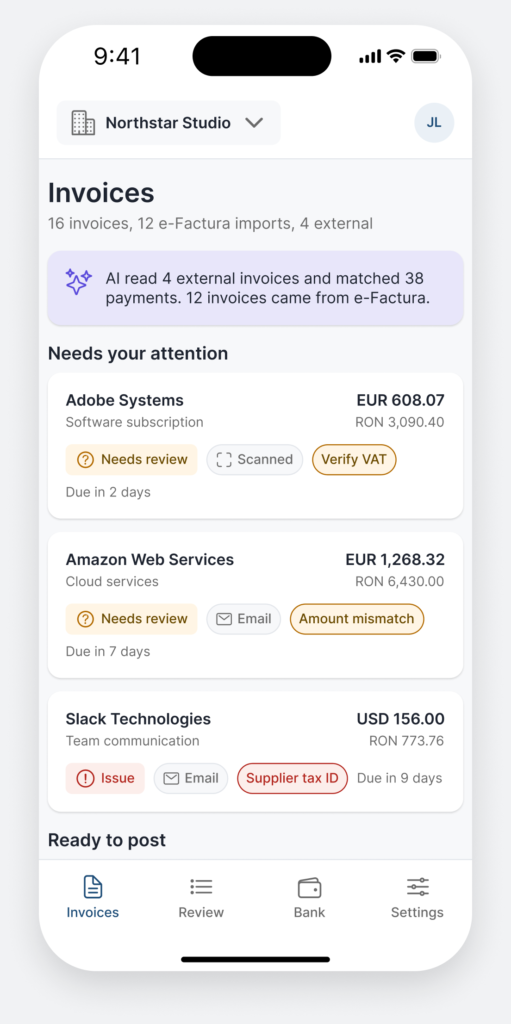
An accountant who serves several small firms checks supplier, number, date, amount, VAT, category and the matching bank payment, again and again. Romanian suppliers arrive structured through e-Factura. Foreign and paper invoices still arrive as PDFs, photos and emails, and someone types them in.
The bank statement shows the rest. A payment without an invoice is easy to overlook until the month is closed.
External invoices are read and typed field by field. It is the slowest part of the month.
A payment without an invoice only shows up when the bank statement is checked.
AI can read a document, but an accountant cannot sign for a guess.
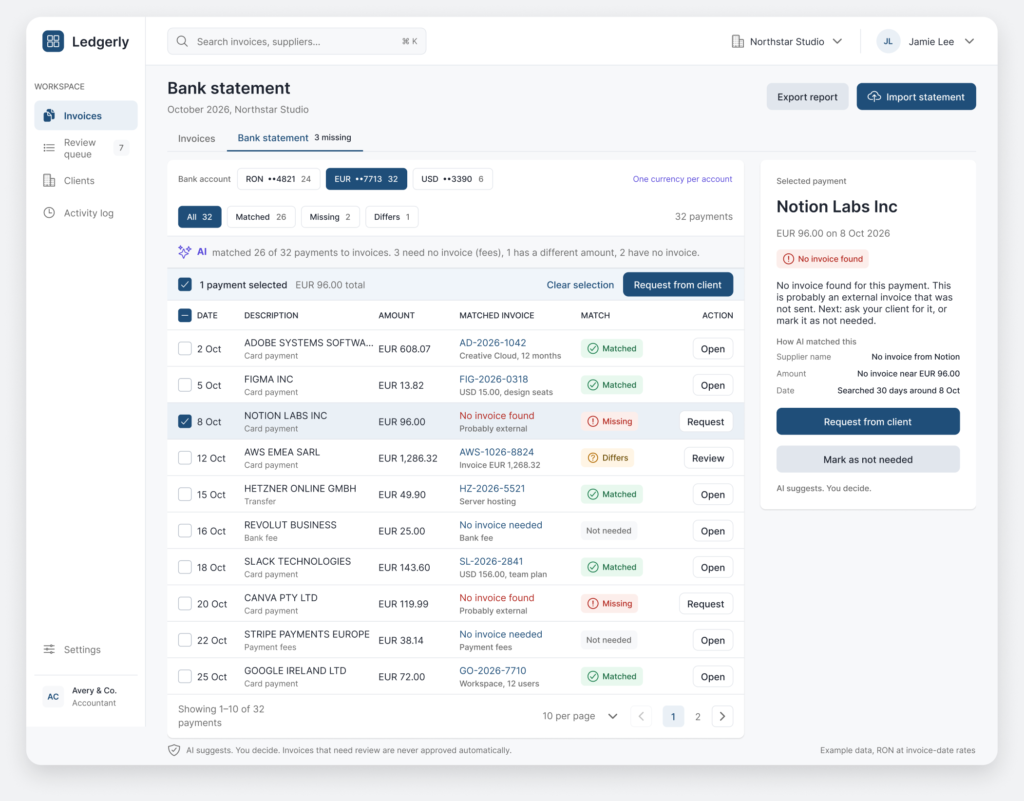
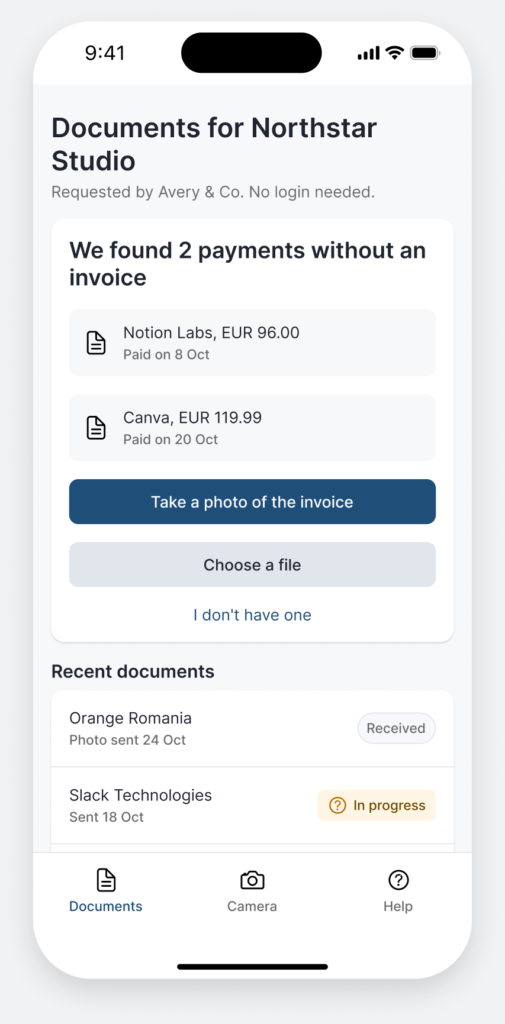
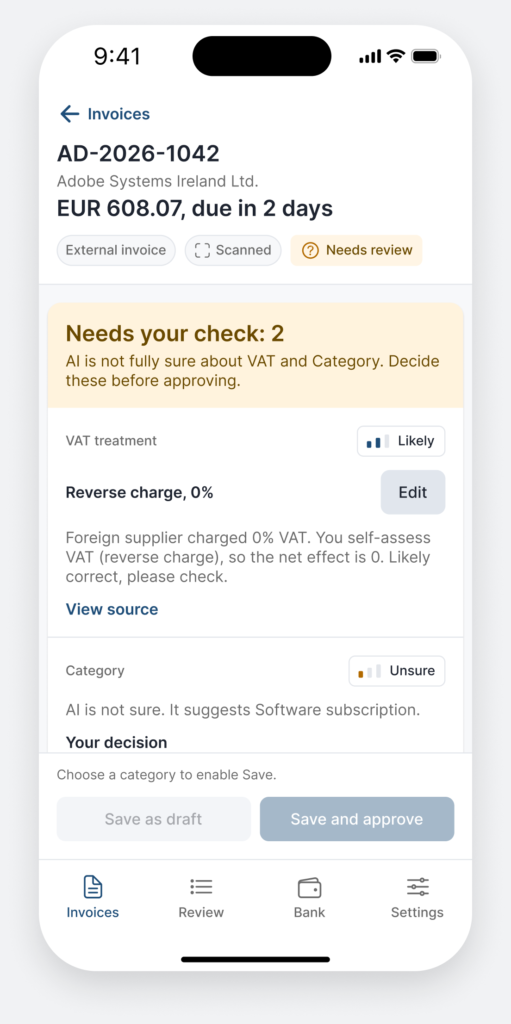
The design question was how much the AI should do, and how the person knows what to trust. Every screen answers it the same way: AI proposes, shows its source and its confidence, and a person accepts or corrects. The only things the AI does alone are inside limits a person sets.
Nothing that needs a decision is posted to the books until a person accepts it.


Twelve steps on desktop and ten on the phone. Each step shows what happens on the screen and which problem it solves. The tour advances on its own, or click to move on.
Desktop: the accountant at their desk.
Mobile: the same flow on a phone, plus the client link.
Three roles use the product. The accountant is the primary persona and the only one backed by an interview. The other two are working hypotheses to validate.
From interview
Primary persona, works on one client at a time
Told by the accountant
Sends the documents the accountant asks for
Hypothesis
Sets the rules for the whole firm
Eight moments in the accountant’s work, what each one looks like today, and what Ledgerly changes. The last column shows what comes from the interview and what is still a hypothesis.
| Moment | Today | With Ledgerly | Screen | Source |
|---|---|---|---|---|
| 1. Receives the documents | Clients send photos or paper | A link on mobile, one photo, no account | Client view | From interview |
| 2. Enters the external invoice | Types every field by hand | AI reads the file and proposes each field, with the source line | Invoice detail | From interview |
| 3. Checks what the AI read | Cannot tell what is reliable | Certain, Likely or Unsure on every field, all editable | Invoice detail | Hypothesis |
| 4. The AI gets something wrong | No safety net, retypes everything | Edit a field, apply it to similar invoices, Undo | Correction modal | Hypothesis |
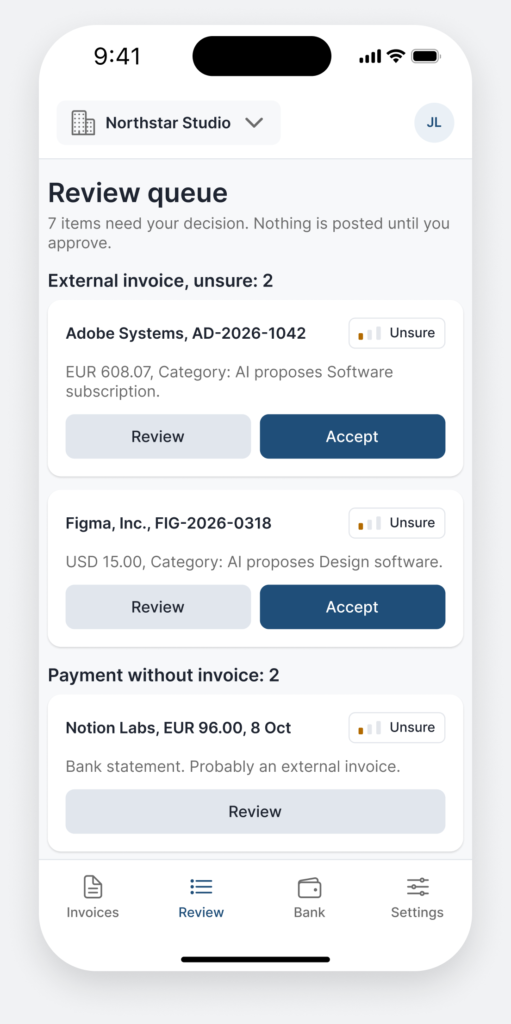
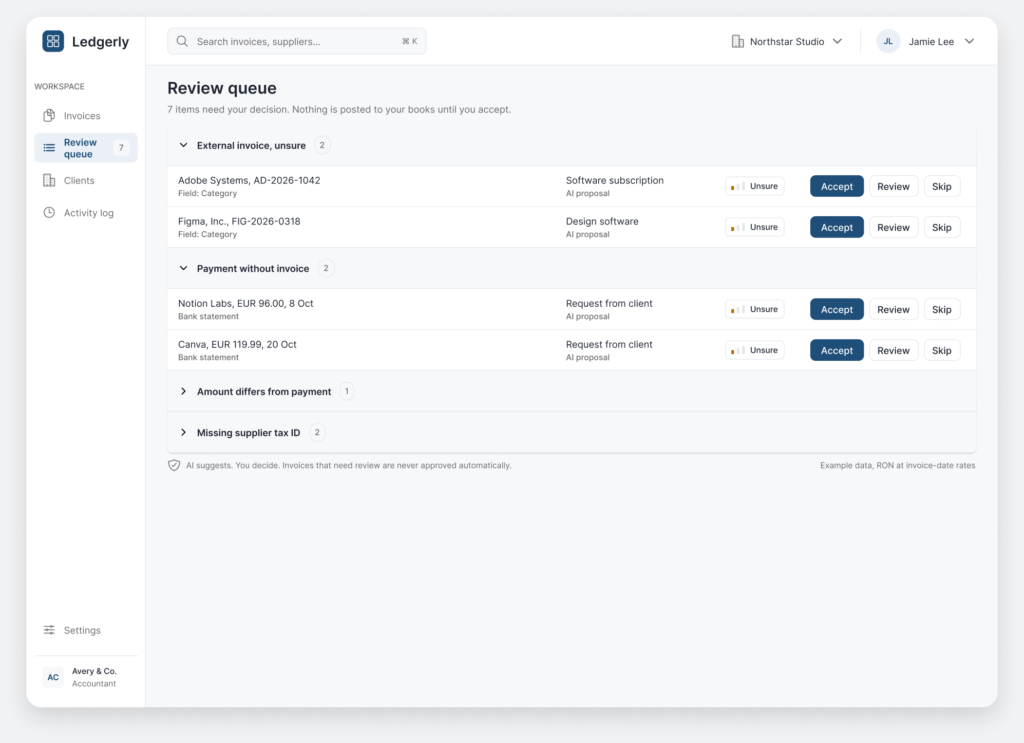
| 5. Triages what is uncertain | Checks everything the same way | A review queue with only what needs a decision | Review queue | Hypothesis |
| 6. Matches the bank statement | Looks for the payment without an invoice by eye | One statement per account and currency: Matched, Differs, Missing or Not needed, with a request button | Bank statement | From interview |
| 7. Asks for the missing document | Calls or writes to the client | Request from client, in one click | Bank statement, Client view | Hypothesis |
| 8. Sets how much AI does alone | Does not exist | Threshold, rules per client and the estimated impact | Settings | Hypothesis |
Three roles, one flow. The red path shows what happens when the AI gets something wrong: the accountant corrects it, and the correction can be undone.
Sends what the accountant asks for
On mobile, no login
Straight from the phone
One thing to do
Checks, corrects and decides
e-Factura, email or photo
With a source and a confidence level
Yes
No review needed
No
Only what is unsure
Sees the source and confidence
Approved by a person
or, if the AI is wrong
Corrects the field, for all 4 similar invoices or just this one
The correction can be reversed
Decides how much AI does alone
For example 95% confidence
Estimated on example data
Applied to every new invoice
Nothing that needs a decision is posted until a person accepts it. Every screen says so in its footer.
Each field is Certain, Likely or Unsure, and the source line is highlighted on the document. You know what to trust and what to check.
Needs review is the status. Verify VAT is the reason. You see what to check before opening the invoice.
Fields that need a decision sit at the top of the card. The Certain fields wait under a divider.
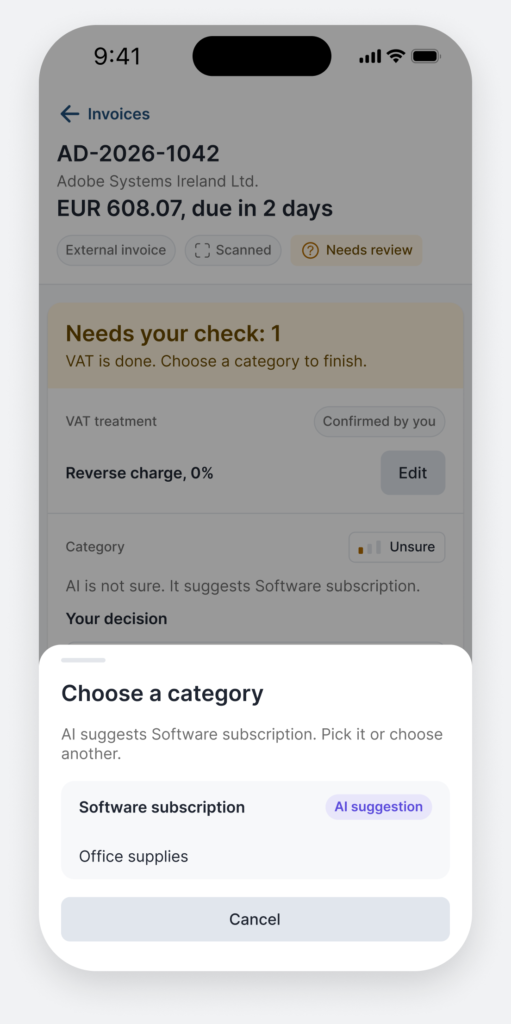
Changing a category shows the earlier invoices it would change. Update all of them, or only this one.
A toast offers Undo after saving, so trying a correction feels safe.
Missing documents are requested in one click, and the client answers from a phone link.



An example month for one client: 16 invoices and 40 bank payments. These are estimates, not measurements. They will be replaced with timed work from real accountants.
| Task | Items | Manual (s each) | Ledgerly (s each) | Manual total (s) | Ledgerly total (s) |
|---|---|---|---|---|---|
| External invoices: read, type, VAT, category, exchange rate | 4 | 240 | 30 | 960 | 120 |
| e-Factura invoices: check against the document | 12 | 45 | 5 | 540 | 60 |
| Matched bank payments | 37 | 25 | 2 | 925 | 74 |
| Exceptions: 2 missing invoices, 1 amount that differs | 3 | 160 | 22 | 480 | 66 |
| Total | 2,905 | 320 |
Manual, typical
With Ledgerly, typical
Typical case: 2,905 seconds by hand (about 48 minutes) against 320 seconds with Ledgerly (about 5 minutes), roughly 89% less.
Conservative case: 1,935 seconds against 597, still about 69% less. It assumes the person is faster by hand and slower with Ledgerly.
Time goes to checking, not typing. The 12 e-Factura invoices and 37 matched payments need a glance, because they arrive structured or are matched by amount and date.
Ledgerly does not only suggest, it can also act. So the design has to say what the AI is about to do, show how it knows, and let the person stop or undo it. The screens below are project designs, not measured results.
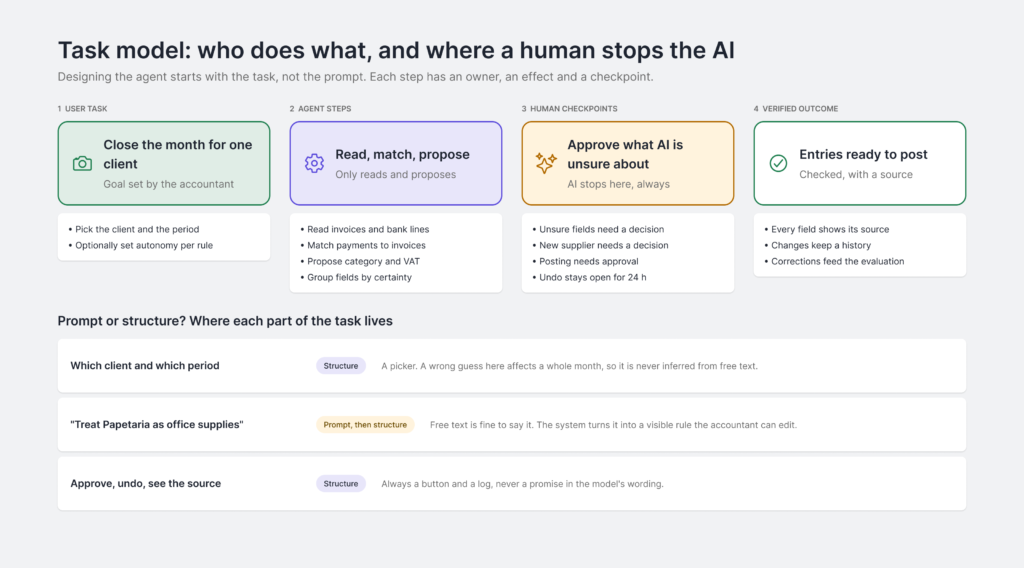
The task has four parts: what the user asks for, what the agent does, where a human decides, and which outcome is verified. Choosing the client and the period is a picker, not free text, because a mistake there affects a whole month.
Before changing anything, the AI shows what it intends to do, in four steps, each with its effect named: read only, proposal, changes data or sends a message. The accountant can proceed, edit or take over. The step that messages a client cannot be undone, so it always asks.
The log says in plain language what changed and why. Undo stays open for 24 hours; after that the button is locked and says so, so the product does not promise what the system cannot do.
Each value is linked to a line in the document. What was read looks different from what was inferred (for example the category, from earlier invoices), so an inferred value never looks as certain.
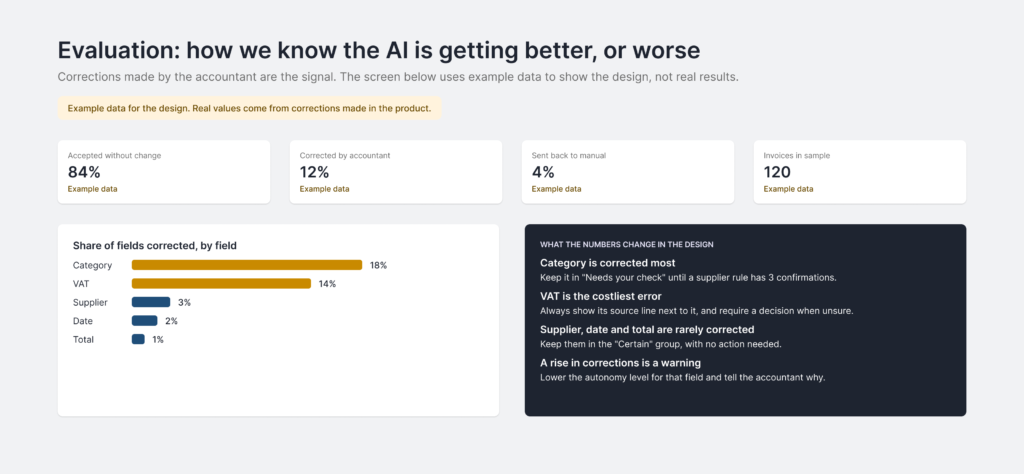
The screen shows what share of fields is accepted unchanged and what is corrected most. The figures in the image are example data, to show the design. They lead to decisions: category stays in "Needs your check" until a rule has 3 confirmations.



UXFACTS SRL · CUI 51977507 · J2025042846007 · Str. Vasile A. Urechia nr. 23, Iași, județul Iași